DeepSeek V3/V3.1/R1 使用指南#
SGLang 提供了许多专门为 DeepSeek 模型设计的优化,使其成为官方 DeepSeek 团队从第一天起就推荐的推理引擎。
本文档概述了当前对 DeepSeek 的优化。 有关已实现功能的概述,请参阅已完成的 Roadmap。
使用 SGLang 启动 DeepSeek V3.1/V3/R1#
要运行 DeepSeek V3.1/V3/R1 模型,推荐的设置如下:
权重类型 |
配置 |
|---|---|
全精度 FP8 |
8 x H200 |
8 x MI300X |
|
2 x 8 x H100/800/20 |
|
Xeon 6980P CPU |
|
全精度 BF16 |
2 x 8 x H200 |
2 x 8 x MI300X |
|
4 x 8 x H100/800/20 |
|
4 x 8 x A100/A800 |
|
量化权重 (AWQ) |
8 x H100/800/20 |
8 x A100/A800 |
|
量化权重 (int8) |
16 x A100/A800 |
32 x L40S |
|
Xeon 6980P CPU |
|
2 x Atlas 800I A3 |
详细命令供参考:
下载权重#
如果启动服务器时遇到错误,请确保权重已下载完成。建议预先下载或多次重启,直到所有权重都下载完毕。请参考 DeepSeek V3 官方指南下载权重。
使用单节点 8 x H200 启动#
请参考 示例。
请注意 Deepseek V3 已经是 FP8 格式,因此不应使用任何量化参数(如 --quantization fp8 --kv-cache-dtype fp8_e5m2)运行它。
在多节点上运行示例#
优化#
多头潜在注意力 (MLA) 吞吐量优化#
描述: MLA 是 DeepSeek 团队引入的一种创新注意力机制,旨在提高推理效率。SGLang 为此实现了特定优化,包括:
权重吸收:通过应用矩阵乘法的结合律来重新排序计算步骤,此方法平衡了计算和内存访问,并在解码阶段提高了效率。
MLA 注意力后端:目前 SGLang 支持不同的优化 MLA 注意力后端,包括 FlashAttention3、Flashinfer、FlashMLA、CutlassMLA、TRTLLM MLA(针对 Blackwell 架构优化)和 Triton 后端。默认的 FA3 在广泛的工作负载下提供良好的性能。
FP8 量化:W8A8 FP8 和 KV Cache FP8 量化实现了高效的 FP8 推理。此外,我们还实现了批量矩阵乘法 (BMM) 算子以促进带权重吸收的 MLA 中的 FP8 推理。
CUDA 图 & Torch.compile:MLA 和混合专家 (MoE) 都兼容 CUDA 图和 Torch.compile,这减少了延迟并加速了小批量场景下的解码速度。
分块前缀缓存:分块前缀缓存优化可以通过将前缀缓存切分成块,使用多头注意力处理它们并合并其状态来提高吞吐量。在长序列上进行分块预填充时,其改进效果可能非常显著。目前此优化仅适用于 FlashAttention3 后端。
总体而言,通过这些优化,我们实现了与前一个版本相比高达 7 倍的输出吞吐量加速。
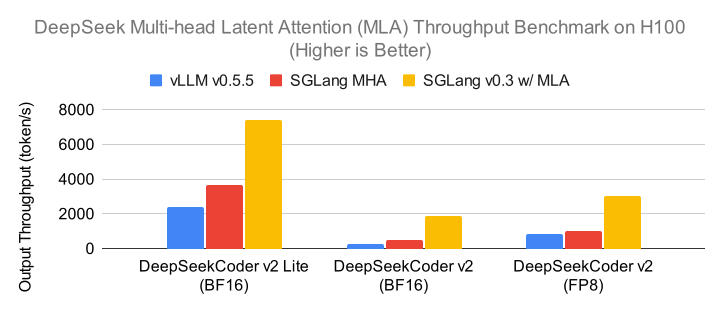
使用:MLA 优化默认启用。对于 Blackwell 架构上的 MLA 模型(如 B200),默认后端是 FlashInfer。要使用优化的 TRTLLM MLA 后端进行预填充和解码操作,请明确指定 --attention-backend trtllm_mla。
数据并行注意力#
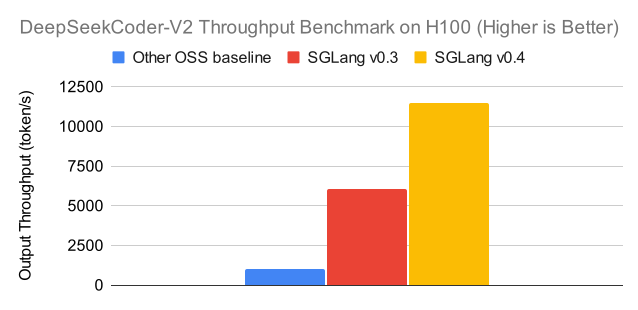
描述:此优化涉及 DeepSeek 系列模型的 MLA 注意力机制的数据并行性 (DP),这可以显著减少 KV 缓存大小,从而支持更大的批量大小。每个 DP 工作进程独立处理不同类型的批次(预填充、解码、空闲),然后在通过混合专家 (MoE) 层处理前后进行同步。如果不使用 DP 注意力,KV 缓存将在所有 TP rank 之间复制。

启用数据并行注意力后,与前一个版本相比,我们实现了高达 1.9 倍的解码吞吐量改进。
使用:
使用 8 个 H200 GPU 时,在服务器参数中附加
--enable-dp-attention --tp 8 --dp 8。此优化在服务器受 KV 缓存容量限制的大批量场景下提高了峰值吞吐量。但是,它不适用于低延迟、小批量场景。DP 和 TP 注意力可以灵活组合。例如,要在每个节点有 8 个 H100 GPU 的 2 个节点上部署 DeepSeek-V3/R1,您可以指定
--enable-dp-attention --tp 16 --dp 2。此配置使用 2 个 DP 组运行注意力,每个组包含 8 个 TP GPU。
参考:查看 Blog。
多节点张量并行#
描述:对于单节点内存有限的用户,SGLang 支持使用张量并行在多个节点上提供服务,包括 DeepSeek V3 在内的 DeepSeek 系列模型。这种方法将模型参数分布在多个 GPU 或节点上,以处理单个节点内存无法容纳的大型模型。
使用:使用示例请查看 这里。
分块 FP8#
描述:SGLang 实现了分块 FP8 量化,具有两个关键优化:
激活:使用每个标记每个 128 通道子向量尺度的 E4M3 格式进行在线转换。
权重:每个 128x128 块的量化,以获得更好的数值稳定性。
DeepGEMM:专用于 FP8 矩阵乘法的 DeepGEMM 内核库。
使用:上述激活和权重优化默认为 DeepSeek V3 模型开启。DeepGEMM 在 NVIDIA Hopper GPU 上默认启用,在其他设备上默认禁用。DeepGEMM 也可以通过设置环境变量 SGLANG_ENABLE_JIT_DEEPGEMM=0 手动关闭。
在提供 DeepSeek 模型之前,使用以下命令预编译 DeepGEMM 内核:
python3 -m sglang.compile_deep_gemm --model deepseek-ai/DeepSeek-V3 --tp 8 --trust-remote-code
预编译过程通常需要约 10 分钟才能完成。
多标记预测#
描述:SGLang 基于 EAGLE 推理解码 实现了 DeepSeek V3 多标记预测 (MTP)。通过此优化,在 H200 TP8 设置下,对于批量大小 1 可解码速度可提高1.8倍,对于批量大小 32 可提高1.5倍。
使用:
添加参数 --speculative-algorithm、--speculative-num-steps、--speculative-eagle-topk 和 --speculative-num-draft-tokens 来启用此功能。例如:
python3 -m sglang.launch_server \
  --model-path deepseek-ai/DeepSeek-V3-0324 \
  --speculative-algorithm EAGLE \
  --speculative-num-steps 1 \
  --speculative-eagle-topk 1 \
  --speculative-num-draft-tokens 2 \
  --trust-remote-code \
  --tp 8
对于给定批量大小,可以使用 bench_speculative.py 脚本搜索
--speculative-num-steps、--speculative-eagle-topk和--speculative-num-draft-tokens的最佳配置。最小配置是--speculative-num-steps 1 --speculative-eagle-topk 1 --speculative-num-draft-tokens 2,可以实现大批量场景下的加速。FlashAttention3、FlashMLA 和 Triton 后端完全支持 MTP 使用。对于带推理解码的 FlashInfer 后端 (
--attention-backend flashinfer),应将--speculative-eagle-topk参数设置为1。CutlassMLA 和 TRTLLM MLA 后端的 MTP 支持仍在开发中。要为大批量 (>32) 启用 DeepSeek MTP,需要更改一些参数(参考 此讨论):
将
--max-running-requests调整为更大的数值。MTP 的默认值为48。对于大批量,应将此值增加到大于默认值。设置
--cuda-graph-bs。这是用于 cuda 图捕获的批量大小列表。推理解码的默认捕获批量大小 在此处 设置。您可以向其中添加更多批量大小。
DeepSeek R1 & V3.1 的推理内容#
请参阅 推理解析器 和 DeepSeek V3.1 的思考参数。
DeepSeek 模型的函数调用#
添加参数 --tool-call-parser deepseekv3 和 --chat-template ./examples/chat_template/tool_chat_template_deepseekv3.jinja(推荐)来启用此功能。例如(在 1 * H20 节点上运行):
python3 -m sglang.launch_server \
  --model deepseek-ai/DeepSeek-V3-0324 \
  --tp 8 \
  --port 30000 \
  --host 0.0.0.0 \
  --mem-fraction-static 0.9 \
  --tool-call-parser deepseekv3 \
  --chat-template ./examples/chat_template/tool_chat_template_deepseekv3.jinja
示例请求:
curl "http://127.0.0.1:30000/v1/chat/completions" \
-H "Content-Type: application/json" \
-d '{"temperature": 0, "max_tokens": 100, "model": "deepseek-ai/DeepSeek-V3-0324", "tools": [{"type": "function", "function": {"name": "query_weather", "description": "Get weather of an city, the user should supply a city first", "parameters": {"type": "object", "properties": {"city": {"type": "string", "description": "The city, e.g. Beijing"}}, "required": ["city"]}}}], "messages": [{"role": "user", "content": "Hows the weather like in Qingdao today"}]}'
预期响应:
{"id":"6501ef8e2d874006bf555bc80cddc7c5","object":"chat.completion","created":1745993638,"model":"deepseek-ai/DeepSeek-V3-0324","choices":[{"index":0,"message":{"role":"assistant","content":null,"reasoning_content":null,"tool_calls":[{"id":"0","index":null,"type":"function","function":{"name":"query_weather","arguments":"{\"city\": \"Qingdao\"}"}}]},"logprobs":null,"finish_reason":"tool_calls","matched_stop":null}],"usage":{"prompt_tokens":116,"total_tokens":138,"completion_tokens":22,"prompt_tokens_details":null}}
示例流式请求:
curl "http://127.0.0.1:30000/v1/chat/completions" \
-H "Content-Type: application/json" \
-d '{"temperature": 0, "max_tokens": 100, "model": "deepseek-ai/DeepSeek-V3-0324","stream":true,"tools": [{"type": "function", "function": {"name": "query_weather", "description": "Get weather of an city, the user should supply a city first", "parameters": {"type": "object", "properties": {"city": {"type": "string", "description": "The city, e.g. Beijing"}}, "required": ["city"]}}}], "messages": [{"role": "user", "content": "Hows the weather like in Qingdao today"}]}'
预期流式块(为清晰起见已简化):
data: {"choices":[{"delta":{"tool_calls":[{"function":{"arguments":"{\""}}]}}]}
data: {"choices":[{"delta":{"tool_calls":[{"function":{"arguments":"city"}}]}}]}
data: {"choices":[{"delta":{"tool_calls":[{"function":{"arguments":"\":\""}}]}}]}
data: {"choices":[{"delta":{"tool_calls":[{"function":{"arguments":"Q"}}]}}]}
data: {"choices":[{"delta":{"tool_calls":[{"function":{"arguments":"ing"}}]}}]}
data: {"choices":[{"delta":{"tool_calls":[{"function":{"arguments":"dao"}}]}}]}
data: {"choices":[{"delta":{"tool_calls":[{"function":{"arguments":"\"}"}}]}}]}
data: {"choices":[{"delta":{"tool_calls":null}}], "finish_reason": "tool_calls"}
data: [DONE]
客户端需要连接所有参数片段以重建完整的函数调用:
{"city": "Qingdao"}
重要说明:
使用较低的温度值以获得更好的结果。
为了获得更一致的函数调用结果,建议使用
--chat-template examples/chat_template/tool_chat_template_deepseekv3.jinja。它提供了改进的统一提示。
DeepSeek R1 的思考预算#
在 SGLang 中,我们可以使用 CustomLogitProcessor 实现思考预算。
使用 --enable-custom-logit-processor 标志启动服务器。
python3 -m sglang.launch_server --model deepseek-ai/DeepSeek-R1 --tp 8 --port 30000 --host 0.0.0.0 --mem-fraction-static 0.9 --disable-cuda-graph --reasoning-parser deepseek-r1 --enable-custom-logit-processor
示例请求:
import openai
from rich.pretty import pprint
from sglang.srt.sampling.custom_logit_processor import DeepSeekR1ThinkingBudgetLogitProcessor


client = openai.Client(base_url="http://127.0.0.1:30000/v1", api_key="*")
response = client.chat.completions.create(
    model="deepseek-ai/DeepSeek-R1",
    messages=[
        {
            "role": "user",
            "content": "Question: Is Paris the Capital of France?",
        }
    ],
    max_tokens=1024,
    extra_body={
        "custom_logit_processor": DeepSeekR1ThinkingBudgetLogitProcessor().to_str(),
        "custom_params": {
            "thinking_budget": 512,
        },
    },
)
pprint(response)
常见问题#
问:模型加载时间过长,遇到 NCCL 超时。我该怎么办?
答:如果您遇到模型加载时间过长和 NCCL 超时的问题,可以尝试增加超时持续时间。启动模型时添加参数 --dist-timeout 3600。这将把超时时间设置为一小时,这通常可以解决问题。